mirror of
https://github.com/yuaotian/go-cursor-help.git
synced 2026-03-07 22:33:39 +00:00

450 lines
14 KiB
Markdown
450 lines
14 KiB
Markdown
# 🚀 Cursor 免费试用重置工具
|
||
|
||
<div align="center">
|
||
|
||
[](https://github.com/yuaotian/go-cursor-help/releases/latest)
|
||
[](https://github.com/yuaotian/go-cursor-help/blob/master/LICENSE)
|
||
[](https://github.com/yuaotian/go-cursor-help/stargazers)
|
||
|
||
[🌟 English](README.md) | [🌏 中文](README_CN.md) | [🌏 日本語](README_JP.md)
|
||
|
||
<img src="/img/cursor.png" alt="Cursor Logo" width="120"/>
|
||
|
||
</div>
|
||
|
||
---
|
||
|
||
<div align="center">
|
||
|
||
## ⚡️【限时特惠】Cursor 高额度成品号
|
||
|
||
🔥 **独享专属 | 稳定30天 | 非破解试用**
|
||
|
||
> 💡 仅需 **¥65** 即可获得 **$65+** 使用价值!
|
||
|
||
| | 套餐 | 🇨🇳 人民币 | 🇺🇸 美元 | 官方价 | 可用总价值* |
|
||
|:---:|:---:|:---:|:---:|:---:|:---|
|
||
| 1️⃣ | **Pro** 🔥 `爆款` | **¥65** | **$10** | $20 | $20 基础 + 奖励 + 透支 ≈ **$45–$65** |
|
||
| 2️⃣ | **Pro+** | **¥265** | **$40** | $60 | $70 基础 + 奖励 + 透支 ≈ **$95–$130** |
|
||
| 3️⃣ | **Ultra** 👑 | **¥888** | **$140** | $200 | $400+ 基础 + 海量奖励 ≈ **$400+** |
|
||
|
||
> 📖 [官网定价文档](https://cursor.com/cn/docs/account/pricing)
|
||
>
|
||
> *ℹ️ 价值说明:总价值 = Base Credits(基础额度)+ Rewards(奖励)+ Overdraft(透支),每月重置。*
|
||
|
||
⚠️ **购买须知**:正规真金充值,独享账号 | 有效期 25–30 天 | 建议≤3台设备 | 7 天质保(换号 / 按天退款)
|
||
|
||
📱 **联系方式**:Telegram: [@yuaotian](https://t.me/yuaotian) | WeChat: `JavaRookie666`
|
||
|
||
---
|
||
|
||
### 📢 招聘广告位
|
||
|
||
> 🔥 **广告位招租** - 欢迎联系洽谈合作
|
||
>
|
||
> 📧 联系方式:Telegram [@yuaotian](https://t.me/yuaotian) | WeChat: `JavaRookie666`
|
||
|
||
---
|
||
|
||
</div>
|
||
|
||
> ⚠️ **重要提示**
|
||
>
|
||
> 本工具当前支持版本:
|
||
> - ✅ Windows: 最新的 2.x.x 版本(已支持)
|
||
> - ✅ Mac/Linux: 最新的 2.x.x 版本(已支持,欢迎测试并反馈问题)
|
||
|
||
> 使用前请确认您的 Cursor 版本。
|
||
|
||
---
|
||
|
||
|
||
### 🚀 系统支持
|
||
|
||
<table>
|
||
<tr>
|
||
<td>
|
||
|
||
**Windows** ✅
|
||
|
||
- x64 & x86
|
||
|
||
</td>
|
||
<td>
|
||
|
||
**macOS** ✅
|
||
|
||
- Intel & M-series
|
||
|
||
</td>
|
||
<td>
|
||
|
||
**Linux** ✅
|
||
|
||
- x64 & ARM64
|
||
|
||
</td>
|
||
</tr>
|
||
</table>
|
||
|
||
|
||
|
||
### 🚀 一键解决方案
|
||
|
||
<details open>
|
||
<summary><b>国内用户(推荐)</b></summary>
|
||
|
||
**macOS**
|
||
|
||
```bash
|
||
curl -fsSL https://wget.la/https://raw.githubusercontent.com/yuaotian/go-cursor-help/refs/heads/master/scripts/run/cursor_mac_id_modifier.sh -o ./cursor_mac_id_modifier.sh && sudo bash ./cursor_mac_id_modifier.sh && rm ./cursor_mac_id_modifier.sh
|
||
```
|
||
|
||
**Linux**
|
||
|
||
```bash
|
||
curl -fsSL https://wget.la/https://raw.githubusercontent.com/yuaotian/go-cursor-help/refs/heads/master/scripts/run/cursor_linux_id_modifier.sh | sudo bash
|
||
```
|
||
|
||
> **Linux 用户请注意:** 该脚本通过检查常用路径(`/usr/bin`, `/usr/local/bin`, `$HOME/.local/bin`, `/opt/cursor`, `/snap/bin`)、使用 `which cursor` 命令以及在 `/usr`、`/opt` 和 `$HOME/.local` 目录内搜索,来尝试定位您的 Cursor 安装。如果 Cursor 安装在其他位置或通过这些方法无法找到,脚本可能会失败。请确保可以通过这些标准位置或方法之一访问到 Cursor。
|
||
|
||
**Windows**
|
||
|
||
```powershell
|
||
irm https://wget.la/https://raw.githubusercontent.com/yuaotian/go-cursor-help/refs/heads/master/scripts/run/cursor_win_id_modifier.ps1 | iex
|
||
```
|
||
|
||
|
||
</details>
|
||
|
||
<div align="center">
|
||
<img src="img/run_success.png" alt="运行成功" width="600"/>
|
||
</div>
|
||
|
||
|
||
<details open>
|
||
<summary><b>Windows 管理员终端运行和手动安装</b></summary>
|
||
|
||
#### Windows 系统打开管理员终端的方法:
|
||
|
||
##### 方法一:使用 Win + X 快捷键
|
||
```md
|
||
1. 按下 Win + X 组合键
|
||
2. 在弹出的菜单中选择以下任一选项:
|
||
- "Windows PowerShell (管理员)"
|
||
- "Windows Terminal (管理员)"
|
||
- "终端(管理员)"
|
||
(具体选项因Windows版本而异)
|
||
```
|
||
|
||
##### 方法二:使用 Win + R 运行命令
|
||
```md
|
||
1. 按下 Win + R 组合键
|
||
2. 在运行框中输入 powershell 或 pwsh
|
||
3. 按 Ctrl + Shift + Enter 以管理员身份运行
|
||
或在打开的窗口中输入: Start-Process pwsh -Verb RunAs
|
||
4. 在管理员终端中输入以下重置脚本:
|
||
|
||
irm https://wget.la/https://raw.githubusercontent.com/yuaotian/go-cursor-help/refs/heads/master/scripts/run/cursor_win_id_modifier.ps1 | iex
|
||
```
|
||
|
||
增强版脚本:
|
||
```powershell
|
||
irm https://wget.la/https://raw.githubusercontent.com/yuaotian/go-cursor-help/refs/heads/master/scripts/run/cursor_win_id_modifier.ps1 | iex
|
||
```
|
||
|
||
##### 方法三:通过搜索启动
|
||
>
|
||
>
|
||
>在搜索框中输入 pwsh,右键选择"以管理员身份运行"
|
||
>
|
||
|
||
在管理员终端中输入重置脚本:
|
||
```powershell
|
||
irm https://wget.la/https://raw.githubusercontent.com/yuaotian/go-cursor-help/refs/heads/master/scripts/run/cursor_win_id_modifier.ps1 | iex
|
||
```
|
||
|
||
增强版脚本:
|
||
```powershell
|
||
irm https://wget.la/https://raw.githubusercontent.com/yuaotian/go-cursor-help/refs/heads/master/scripts/run/cursor_win_id_modifier.ps1 | iex
|
||
```
|
||
|
||
### 🔧 PowerShell 安装指南
|
||
|
||
如果您的系统没有安装 PowerShell,可以通过以下方法安装:
|
||
|
||
#### 方法一:使用 Winget 安装(推荐)
|
||
|
||
1. 打开命令提示符或 PowerShell
|
||
2. 运行以下命令:
|
||
```powershell
|
||
winget install --id Microsoft.PowerShell --source winget
|
||
```
|
||
|
||
#### 方法二:手动下载安装
|
||
|
||
1. 下载对应系统的安装包:
|
||
- [PowerShell-7.4.6-win-x64.msi](https://github.com/PowerShell/PowerShell/releases/download/v7.4.6/PowerShell-7.4.6-win-x64.msi) (64位系统)
|
||
- [PowerShell-7.4.6-win-x86.msi](https://github.com/PowerShell/PowerShell/releases/download/v7.4.6/PowerShell-7.4.6-win-x86.msi) (32位系统)
|
||
- [PowerShell-7.4.6-win-arm64.msi](https://github.com/PowerShell/PowerShell/releases/download/v7.4.6/PowerShell-7.4.6-win-arm64.msi) (ARM64系统)
|
||
|
||
2. 双击下载的安装包,按提示完成安装
|
||
|
||
> 💡 如果仍然遇到问题,可以参考 [Microsoft 官方安装指南](https://learn.microsoft.com/zh-cn/powershell/scripting/install/installing-powershell-on-windows)
|
||
|
||
</details>
|
||
|
||
#### Windows 安装特性:
|
||
|
||
- 🔍 自动检测并使用 PowerShell 7(如果可用)
|
||
- 🛡️ 通过 UAC 提示请求管理员权限
|
||
- 📝 如果没有 PS7 则使用 Windows PowerShell
|
||
- 💡 如果提权失败会提供手动说明
|
||
|
||
完成后,脚本将:
|
||
|
||
1. ✨ 自动安装工具
|
||
2. 🔄 立即重置 Cursor 试用期
|
||
|
||
### 📦 手动安装
|
||
|
||
> 从 [releases](https://github.com/yuaotian/go-cursor-help/releases/latest) 下载适合您系统的文件
|
||
|
||
<details>
|
||
<summary>Windows 安装包</summary>
|
||
|
||
- 64 位: `cursor-id-modifier_windows_x64.exe`
|
||
- 32 位: `cursor-id-modifier_windows_x86.exe`
|
||
</details>
|
||
|
||
<details>
|
||
<summary>macOS 安装包</summary>
|
||
|
||
- Intel: `cursor-id-modifier_darwin_x64_intel`
|
||
- M1/M2: `cursor-id-modifier_darwin_arm64_apple_silicon`
|
||
</details>
|
||
|
||
<details>
|
||
<summary>Linux 安装包</summary>
|
||
|
||
- 64 位: `cursor-id-modifier_linux_x64`
|
||
- 32 位: `cursor-id-modifier_linux_x86`
|
||
- ARM64: `cursor-id-modifier_linux_arm64`
|
||
</details>
|
||
|
||
### 🔧 技术细节
|
||
|
||
<details>
|
||
<summary><b>注册表修改说明</b></summary>
|
||
|
||
> ⚠️ **重要提示:本工具会修改系统注册表**
|
||
|
||
#### 修改内容
|
||
- 路径:`计算机\HKEY_LOCAL_MACHINE\SOFTWARE\Microsoft\Cryptography`
|
||
- 项目:`MachineGuid`
|
||
|
||
#### 潜在影响
|
||
修改此注册表项可能会影响:
|
||
- Windows 系统对设备的唯一标识
|
||
- 某些软件的设备识别和授权状态
|
||
- 基于硬件标识的系统功能
|
||
|
||
#### 安全措施
|
||
1. 自动备份
|
||
- 每次修改前会自动备份原始值
|
||
- 备份保存在:`%APPDATA%\Cursor\User\globalStorage\backups`
|
||
- 备份文件格式:`MachineGuid.backup_YYYYMMDD_HHMMSS`
|
||
|
||
2. 手动恢复方法
|
||
- 打开注册表编辑器(regedit)
|
||
- 定位到:`计算机\HKEY_LOCAL_MACHINE\SOFTWARE\Microsoft\Cryptography`
|
||
- 右键点击 `MachineGuid`
|
||
- 选择"修改"
|
||
- 粘贴备份文件中的值
|
||
|
||
#### 注意事项
|
||
- 建议在修改前先确认备份文件的存在
|
||
- 如遇问题可通过备份文件恢复原始值
|
||
- 必须以管理员权限运行才能修改注册表
|
||
</details>
|
||
|
||
<details>
|
||
<summary><b>配置文件</b></summary>
|
||
|
||
程序修改 Cursor 的`storage.json`配置文件,位于:
|
||
|
||
- Windows: `%APPDATA%\Cursor\User\globalStorage\`
|
||
- macOS: `~/Library/Application Support/Cursor/User/globalStorage/`
|
||
- Linux: `~/.config/Cursor/User/globalStorage/`
|
||
</details>
|
||
|
||
<details>
|
||
<summary><b>修改字段</b></summary>
|
||
|
||
工具会生成新的唯一标识符:
|
||
|
||
- `telemetry.machineId`
|
||
- `telemetry.macMachineId`
|
||
- `telemetry.devDeviceId`
|
||
- `telemetry.sqmId`
|
||
</details>
|
||
|
||
<details>
|
||
<summary><b>手动禁用自动更新</b></summary>
|
||
|
||
Windows 用户可以手动禁用自动更新功能:
|
||
|
||
1. 关闭所有 Cursor 进程
|
||
2. 删除目录:`C:\Users\用户名\AppData\Local\cursor-updater`
|
||
3. 创建同名文件:`cursor-updater`(不带扩展名)
|
||
|
||
Linux用户可以尝试在系统中找到类似的`cursor-updater`目录进行相同操作。
|
||
|
||
MacOS用户按照以下步骤操作:
|
||
|
||
```bash
|
||
# 注意:经测试,此方法仅适用于0.45.11及以下版本,不支持0.46.*版本
|
||
# 关闭所有 Cursor 进程
|
||
pkill -f "Cursor"
|
||
|
||
# 备份app-update.yml并创建空的只读文件代替原文件
|
||
cd /Applications/Cursor.app/Contents/Resources
|
||
mv app-update.yml app-update.yml.bak
|
||
touch app-update.yml
|
||
chmod 444 app-update.yml
|
||
|
||
# 打开Cursor设置,将更新模式设置为"无",该步骤必须执行,否则Cursor依然会自动检查更新
|
||
# 步骤:Settings -> Application -> Update, 将Mode设置为none
|
||
|
||
# 注意: cursor-updater修改方法可能已失效。但为了以防万一,还是删除更新目录并创建阻止文件
|
||
rm -rf ~/Library/Application\ Support/Caches/cursor-updater
|
||
touch ~/Library/Application\ Support/Caches/cursor-updater
|
||
```
|
||
</details>
|
||
|
||
<details>
|
||
<summary><b>安全特性</b></summary>
|
||
|
||
- ✅ 安全的进程终止
|
||
- ✅ 原子文件操作
|
||
- ✅ 错误处理和恢复
|
||
</details>
|
||
|
||
<details>
|
||
<summary><b>重置 Cursor 免费试用</b></summary>
|
||
|
||
### 使用 `cursor_free_trial_reset.sh` 脚本
|
||
|
||
#### macOS
|
||
|
||
```bash
|
||
curl -fsSL https://raw.githubusercontent.com/yuaotian/go-cursor-help/refs/heads/master/scripts/run/cursor_free_trial_reset.sh -o ./cursor_free_trial_reset.sh && sudo bash ./cursor_free_trial_reset.sh && rm ./cursor_free_trial_reset.sh
|
||
```
|
||
|
||
#### Linux
|
||
|
||
```bash
|
||
curl -fsSL https://raw.githubusercontent.com/yuaotian/go-cursor-help/refs/heads/master/scripts/run/cursor_free_trial_reset.sh | sudo bash
|
||
```
|
||
|
||
#### Windows
|
||
|
||
```powershell
|
||
irm https://raw.githubusercontent.com/yuaotian/go-cursor-help/refs/heads/master/scripts/run/cursor_free_trial_reset.sh | iex
|
||
```
|
||
|
||
</details>
|
||
|
||
## 联系方式
|
||
|
||
<div align="center">
|
||
<table>
|
||
<tr>
|
||
<td align="center">
|
||
<b>个人微信</b><br>
|
||
<img src="img/wx_me.png" width="250" alt="作者微信"><br>
|
||
<b>微信:JavaRookie666</b>
|
||
</td>
|
||
<td align="center">
|
||
<b>微信交流群</b><br>
|
||
<img src="img/qun-21.jpg" width="500" alt="WeChat"><br>
|
||
<small>二维码7天内(11月25日前)有效,过期请加微信或者公众号`煎饼果子卷AI`</small>
|
||
</td>
|
||
<td align="center">
|
||
<b>公众号</b><br>
|
||
<img src="img/wx_public_2.png" width="250" alt="微信公众号"><br>
|
||
<small>获取更多AI开发资源</small>
|
||
</td>
|
||
<td align="center">
|
||
<b>微信赞赏</b><br>
|
||
<img src="img/wx_zsm2.png" width="500" alt="微信赞赏码"><br>
|
||
<small>要到饭咧?啊咧?啊咧?不给也没事~ 请随意打赏</small>
|
||
</td>
|
||
<td align="center">
|
||
<b>支付宝赞赏</b><br>
|
||
<img src="img/alipay.png" width="500" alt="支付宝赞赏码"><br>
|
||
<small>如果觉得有帮助,来包辣条犒劳一下吧~</small>
|
||
</td>
|
||
</tr>
|
||
</table>
|
||
</div>
|
||
|
||
### 💳 付款方式(捐赠)
|
||
|
||
- 🪙 **USDT(泰达币)**
|
||
- 🔴 TRC-20(波场):`TFbJnoY5Lep5ZrDwBbT8rV1i8xR4ZhX53k`
|
||
- 🟡 Polygon / BSC / Arbitrum:`0x44f8925b9f93b3d6da8d5ad26a3516e3e652cc88`
|
||
- 🟦 **莱特币(LTC)**:`LVrigKxtWfPymMRtRqL3z2eZxfncR3dPV7`
|
||
|
||
|
||
---
|
||
|
||
### 📚 推荐阅读
|
||
|
||
- [Cursor 异常问题收集和解决方案](https://mp.weixin.qq.com/s/pnJrH7Ifx4WZvseeP1fcEA)
|
||
- [AI 通用开发助手提示词指南](https://mp.weixin.qq.com/s/PRPz-qVkFJSgkuEKkTdzwg)
|
||
|
||
---
|
||
|
||
## 💬 反馈与建议
|
||
|
||
我们非常重视您对新增强脚本的反馈!如果您已经尝试了 `cursor_win_id_modifier.ps1` 脚本,请分享您的使用体验:
|
||
|
||
- 🐛 **错误报告**:发现任何问题?请告诉我们!
|
||
- 💡 **功能建议**:有改进想法?
|
||
- ⭐ **成功案例**:分享工具如何帮助到您!
|
||
- 🔧 **技术反馈**:性能、兼容性或易用性方面的见解
|
||
|
||
您的反馈帮助我们为所有人改进工具。欢迎提交issue或为项目做出贡献!
|
||
|
||
---
|
||
|
||
## ⭐ 项目统计
|
||
|
||
<div align="center">
|
||
|
||
[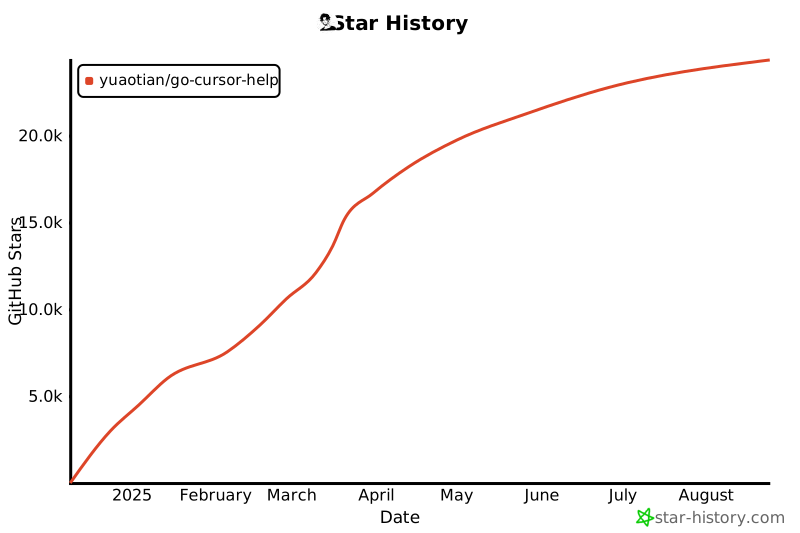](https://star-history.com/#yuaotian/go-cursor-help&Date)
|
||
|
||
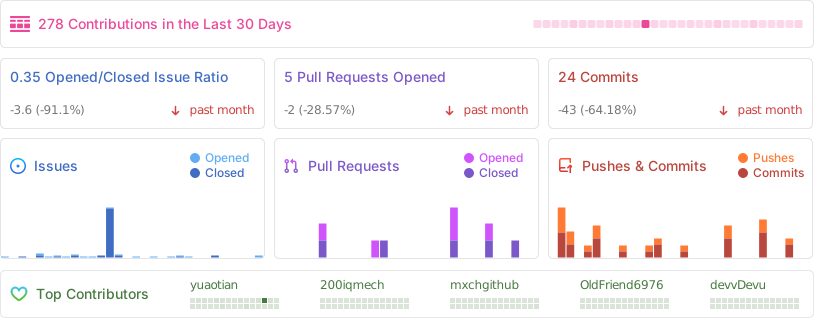
|
||
|
||
</div>
|
||
|
||
## 📄 许可证
|
||
|
||
<details>
|
||
<summary><b>MIT 许可证</b></summary>
|
||
|
||
Copyright (c) 2024
|
||
|
||
Permission is hereby granted, free of charge, to any person obtaining a copy
|
||
of this software and associated documentation files (the "Software"), to deal
|
||
in the Software without restriction, including without limitation the rights
|
||
to use, copy, modify, merge, publish, distribute, sublicense, and/or sell
|
||
copies of the Software, and to permit persons to whom the Software is
|
||
furnished to do so, subject to the following conditions:
|
||
|
||
The above copyright notice and this permission notice shall be included in all
|
||
copies or substantial portions of the Software.
|
||
|
||
</details>
|