mirror of
https://github.com/yuaotian/go-cursor-help.git
synced 2026-03-07 22:33:39 +00:00
 35adfc335a
docs(README): 重构文档结构并统一多语言版本

- 将原有的表格布局改为简洁的Markdown表格格式
- 统一中英文版本的文档结构和内容展示方式
- 合并产品计划部分,使用统一的产品概览表格
- 简化联系方式和购买须知的展示格式
- 优化各产品详情的组织结构,提升可读性
```
462 lines
16 KiB
Markdown
462 lines
16 KiB
Markdown
# 🚀 Cursor Free Trial Reset Tool
|
||
|
||
<div align="center">
|
||
|
||
[](https://github.com/yuaotian/go-cursor-help/releases/latest)
|
||
[](https://github.com/yuaotian/go-cursor-help/blob/master/LICENSE)
|
||
[](https://github.com/yuaotian/go-cursor-help/stargazers)
|
||
|
||
[🌟 English](README.md) | [🌏 中文](README_CN.md) | [🌏 日本語](README_JP.md)
|
||
|
||
<img src="/img/cursor.png" alt="Cursor Logo" width="120"/>
|
||
|
||
</div>
|
||
|
||
---
|
||
|
||
<div align="center">
|
||
|
||
## ⚡️ [Flash Sale] Cursor Pro High‑Credit Accounts
|
||
|
||
<img src="https://img.shields.io/badge/🔥_Private_&_Exclusive-30_Days_Stable-FF6B6B?style=for-the-badge" alt="Private & Exclusive"/> <img src="https://img.shields.io/badge/💎_Legit_Top--up-NOT_Cracked-4ECDC4?style=for-the-badge" alt="Legit Top-up"/> <img src="https://img.shields.io/badge/⭐_Official_Account-Full_Warranty-45B7D1?style=for-the-badge" alt="Official Account"/>
|
||
|
||
> 💡 Get **$65+** usage value for only **$10**! | 📖 [Official Pricing Reference](https://cursor.com/cn/docs/account/pricing)
|
||
|
||
<!-- ==================== 📦 Cursor Product Plans Overview ==================== -->
|
||
|
||
| Type | Plan | 💰 Price | 📊 Official | 💎 Total Value / Note |
|
||
|:---:|:---|:---:|:---:|:---|
|
||
| **🏆 Member** | **Pro** 🔥 `HOT` | **¥65** / $10 | $20 | ≈ **$45–$65** (Base+Rewards+Overdraft) |
|
||
| **🏆 Member** | **Pro+** 💫 | **¥265** / $40 | $60 | ≈ **$95–$130** (Base+Rewards+Overdraft) |
|
||
| **🏆 Member** | **Ultra** 👑 `FLAGSHIP` | **¥888** / $140 | $200 | ≈ **$400+** (Base+Massive Rewards) |
|
||
| **🎯 Limited** | **Half-Month Pass** 🏷️ `LIMITED` | **¥488** / $70 | — | 14-Day Exclusive 1000 Reqs + $20, **More durable than Ultra** |
|
||
| **🆕 Basic** | **Cursor Trial Acct** | **$1** /each | — | Guaranteed working, Bulk discount |
|
||
| **🆕 Basic** | **Gemini 3.0 Pro** 💎 | **¥85** / $12 | — | 1-Year Sub, Stable Google Acct, 3-Day Warranty |
|
||
|
||
> ℹ️ **Value Note**: Member plan total value = Base Credits + Rewards + Overdraft (monthly resets apply).
|
||
|
||
<details>
|
||
<summary>📋 <b>Product Details</b> (Click to expand)</summary>
|
||
|
||
<br>
|
||
|
||
#### 🏷️ Half-Month Pass Details
|
||
| Item | Description |
|
||
|:---|:---|
|
||
| **Service** | Cursor Official Business Member - 14-day account (deleted after use) |
|
||
| **14-Day Exclusive** | Personal exclusive business official request-based account with **1000** fast requests + **$20** model usage credit |
|
||
| **Billing** | Deducts request counts first, then the additional $20 credit. Note: Max models consume more counts. No slow-speed unlimited mode |
|
||
| **Full Access** | All models available, no functional restrictions |
|
||
| **Official & Warranty** | Guaranteed official account, full warranty, after-sales support. Renewable! |
|
||
|
||
> 💡 **More durable than the $200/Ultra plan! Experience it yourself!**
|
||
|
||
---
|
||
|
||
#### 💳 Cursor Trial Account Details
|
||
| Item | Description |
|
||
|:---|:---|
|
||
| **Delivery Format** | `Account ---- Cursor Password ---- Email Password ---- Long-term cookies` |
|
||
| **Warranty** | Check within **1 hour** of receipt. No support after timeout |
|
||
| **Login URL** | cursor.com (Direct Login) |
|
||
|
||
---
|
||
|
||
#### 💎 Gemini 3.0 Pro Details
|
||
| Item | Description |
|
||
|:---|:---|
|
||
| **Description** | 3-Day Warranty. Super stable Google accounts (6mo-1yr+). Quality far exceeds temporary email accounts. Suitable even for GCP |
|
||
| **Account Format** | `Account----Password----Recovery Email----2FA` |
|
||
| **Instructions** | ① Immediately bind your own recovery email, password, and phone number after login ② **Important**: Keep using the same IP address for the first 3 days |
|
||
|
||
</details>
|
||
|
||
---
|
||
|
||
<!-- ==================== 📢 Purchase Notice & Contact ==================== -->
|
||
|
||
| ⚠️ **Before You Buy** | 📱 **Contact** |
|
||
|:---|:---|
|
||
| 💎 Legit top-up, private account | <img src="https://img.shields.io/badge/Telegram-2CA5E0?style=flat-square&logo=telegram&logoColor=white"/> [@yuaotian](https://t.me/yuaotian) |
|
||
| ⏱️ Valid 25–30 days \| 💻 Recommended ≤3 devices | <img src="https://img.shields.io/badge/WeChat-07C160?style=flat-square&logo=wechat&logoColor=white"/> `JavaRookie666` |
|
||
| 🛡️ 7-day warranty (replacement / pro-rated refund) | |
|
||
|
||
---
|
||
|
||
### 📢 Advertising Space
|
||
|
||
> 🔥 **Ad Space Available** - Contact for partnership opportunities
|
||
>
|
||
> 📧 Contact: Telegram [@yuaotian](https://t.me/yuaotian) | WeChat: `JavaRookie666`
|
||
|
||
---
|
||
|
||
</div>
|
||
|
||
> ⚠️ **IMPORTANT NOTICE**
|
||
>
|
||
> This tool currently supports:
|
||
> - ✅ Windows: Latest 2.x.x versions (Supported)
|
||
> - ✅ Mac/Linux: Latest 2.x.x versions (Supported, feedback welcome)
|
||
>
|
||
> Please check your Cursor version before using this tool.
|
||
|
||
---
|
||
|
||
### 🚀 One-Click Solution
|
||
|
||
<details open>
|
||
<summary><b>Global Users</b></summary>
|
||
|
||
**macOS**
|
||
|
||
```bash
|
||
curl -fsSL https://raw.githubusercontent.com/yuaotian/go-cursor-help/refs/heads/master/scripts/run/cursor_mac_id_modifier.sh -o ./cursor_mac_id_modifier.sh && sudo bash ./cursor_mac_id_modifier.sh && rm ./cursor_mac_id_modifier.sh
|
||
```
|
||
|
||
**Linux**
|
||
|
||
```bash
|
||
curl -fsSL https://raw.githubusercontent.com/yuaotian/go-cursor-help/refs/heads/master/scripts/run/cursor_linux_id_modifier.sh | sudo bash
|
||
```
|
||
|
||
> **Note for Linux users:** The script attempts to find your Cursor installation by checking common paths (`/usr/bin`, `/usr/local/bin`, `$HOME/.local/bin`, `/opt/cursor`, `/snap/bin`), using the `which cursor` command, and searching within `/usr`, `/opt`, and `$HOME/.local`. If Cursor is installed elsewhere or not found via these methods, the script may fail. Ensure Cursor is accessible via one of these standard locations or methods.
|
||
|
||
**Windows**
|
||
|
||
```powershell
|
||
irm https://raw.githubusercontent.com/yuaotian/go-cursor-help/refs/heads/master/scripts/run/cursor_win_id_modifier.ps1 | iex
|
||
```
|
||
|
||
**Tip (Windows):** If you suspect a cached old script (mirror/proxy cache), append a timestamp query parameter to bypass cache:
|
||
|
||
```powershell
|
||
irm "https://raw.githubusercontent.com/yuaotian/go-cursor-help/refs/heads/master/scripts/run/cursor_win_id_modifier.ps1?$(Get-Date -Format yyyyMMddHHmmss)" | iex
|
||
```
|
||
|
||
|
||
|
||
</details>
|
||
|
||
|
||
<details open>
|
||
<summary><b>China Users (Recommended)</b></summary>
|
||
|
||
**macOS**
|
||
|
||
```bash
|
||
curl -fsSL https://wget.la/https://raw.githubusercontent.com/yuaotian/go-cursor-help/refs/heads/master/scripts/run/cursor_mac_id_modifier.sh -o ./cursor_mac_id_modifier.sh && sudo bash ./cursor_mac_id_modifier.sh && rm ./cursor_mac_id_modifier.sh
|
||
```
|
||
|
||
**Linux**
|
||
|
||
```bash
|
||
curl -fsSL https://wget.la/https://raw.githubusercontent.com/yuaotian/go-cursor-help/refs/heads/master/scripts/run/cursor_linux_id_modifier.sh | sudo bash
|
||
```
|
||
|
||
**Windows**
|
||
|
||
```powershell
|
||
irm https://wget.la/https://raw.githubusercontent.com/yuaotian/go-cursor-help/refs/heads/master/scripts/run/cursor_win_id_modifier.ps1 | iex
|
||
```
|
||
|
||
**Tip (Windows):** If the mirror caches old content, append `?$(Get-Date -Format yyyyMMddHHmmss)` to the URL:
|
||
|
||
```powershell
|
||
irm "https://wget.la/https://raw.githubusercontent.com/yuaotian/go-cursor-help/refs/heads/master/scripts/run/cursor_win_id_modifier.ps1?$(Get-Date -Format yyyyMMddHHmmss)" | iex
|
||
```
|
||
|
||
</details>
|
||
|
||
|
||
<div align="center">
|
||
<img src="img/run_success.png" alt="Run Success" width="600"/>
|
||
</div>
|
||
|
||
<details open>
|
||
<summary><b>Windows Terminal Run and Configuration</b></summary>
|
||
|
||
#### How to Open Administrator Terminal in Windows:
|
||
|
||
##### Method 1: Using Win + X Shortcut
|
||
```md
|
||
1. Press Win + X key combination
|
||
2. Select one of these options from the menu:
|
||
- "Windows PowerShell (Administrator)"
|
||
- "Windows Terminal (Administrator)"
|
||
- "Terminal (Administrator)"
|
||
(Options may vary depending on Windows version)
|
||
```
|
||
|
||
##### Method 2: Using Win + R Run Command
|
||
```md
|
||
1. Press Win + R key combination
|
||
2. Type powershell or pwsh in the Run dialog
|
||
3. Press Ctrl + Shift + Enter to run as administrator
|
||
or type in the opened window: Start-Process pwsh -Verb RunAs
|
||
4. Enter the reset script in the administrator terminal:
|
||
|
||
irm https://wget.la/https://raw.githubusercontent.com/yuaotian/go-cursor-help/refs/heads/master/scripts/run/cursor_win_id_modifier.ps1 | iex
|
||
```
|
||
|
||
For the enhanced version:
|
||
```powershell
|
||
irm https://wget.la/https://raw.githubusercontent.com/yuaotian/go-cursor-help/refs/heads/master/scripts/run/cursor_win_id_modifier.ps1 | iex
|
||
```
|
||
|
||
##### Method 3: Using Search
|
||
>
|
||
>
|
||
>Type pwsh in the search box, right-click and select "Run as administrator"
|
||
>
|
||
|
||
Enter the reset script in the administrator terminal:
|
||
```powershell
|
||
irm https://wget.la/https://raw.githubusercontent.com/yuaotian/go-cursor-help/refs/heads/master/scripts/run/cursor_win_id_modifier.ps1 | iex
|
||
```
|
||
|
||
For the enhanced version:
|
||
```powershell
|
||
irm https://wget.la/https://raw.githubusercontent.com/yuaotian/go-cursor-help/refs/heads/master/scripts/run/cursor_win_id_modifier.ps1 | iex
|
||
```
|
||
|
||
### 🔧 PowerShell Installation Guide
|
||
|
||
If PowerShell is not installed on your system, you can install it using one of these methods:
|
||
|
||
#### Method 1: Install via Winget (Recommended)
|
||
|
||
1. Open Command Prompt or PowerShell
|
||
2. Run the following command:
|
||
```powershell
|
||
winget install --id Microsoft.PowerShell --source winget
|
||
```
|
||
|
||
#### Method 2: Manual Installation
|
||
|
||
1. Download the installer for your system:
|
||
- [PowerShell-7.4.6-win-x64.msi](https://github.com/PowerShell/PowerShell/releases/download/v7.4.6/PowerShell-7.4.6-win-x64.msi) (64-bit systems)
|
||
- [PowerShell-7.4.6-win-x86.msi](https://github.com/PowerShell/PowerShell/releases/download/v7.4.6/PowerShell-7.4.6-win-x86.msi) (32-bit systems)
|
||
- [PowerShell-7.4.6-win-arm64.msi](https://github.com/PowerShell/PowerShell/releases/download/v7.4.6/PowerShell-7.4.6-win-arm64.msi) (ARM64 systems)
|
||
|
||
2. Double-click the downloaded installer and follow the installation prompts
|
||
|
||
> 💡 If you encounter any issues, please refer to the [Microsoft Official Installation Guide](https://learn.microsoft.com/en-us/powershell/scripting/install/installing-powershell-on-windows)
|
||
|
||
</details>
|
||
|
||
#### Windows 安装特性:
|
||
|
||
- 🔍 Automatically detects and uses PowerShell 7 if available
|
||
- 🛡️ Requests administrator privileges via UAC prompt
|
||
- 📝 Falls back to Windows PowerShell if PS7 isn't found
|
||
- 💡 Provides manual instructions if elevation fails
|
||
|
||
That's it! The script will:
|
||
|
||
1. ✨ Install the tool automatically
|
||
2. 🔄 Reset your Cursor trial immediately
|
||
|
||
### 📦 Manual Installation
|
||
|
||
> Download the appropriate file for your system from [releases](https://github.com/yuaotian/go-cursor-help/releases/latest)
|
||
|
||
<details>
|
||
<summary>Windows Packages</summary>
|
||
|
||
- 64-bit: `cursor-id-modifier_windows_x64.exe`
|
||
- 32-bit: `cursor-id-modifier_windows_x86.exe`
|
||
</details>
|
||
|
||
<details>
|
||
<summary>macOS Packages</summary>
|
||
|
||
- Intel: `cursor-id-modifier_darwin_x64_intel`
|
||
- M1/M2: `cursor-id-modifier_darwin_arm64_apple_silicon`
|
||
</details>
|
||
|
||
<details>
|
||
<summary>Linux Packages</summary>
|
||
|
||
- 64-bit: `cursor-id-modifier_linux_x64`
|
||
- 32-bit: `cursor-id-modifier_linux_x86`
|
||
- ARM64: `cursor-id-modifier_linux_arm64`
|
||
</details>
|
||
|
||
### 🔧 Technical Details
|
||
|
||
<details>
|
||
<summary><b>Configuration Files</b></summary>
|
||
|
||
The program modifies Cursor's `storage.json` config file located at:
|
||
|
||
- Windows: `%APPDATA%\Cursor\User\globalStorage\storage.json`
|
||
- macOS: `~/Library/Application Support/Cursor/User/globalStorage/storage.json`
|
||
- Linux: `~/.config/Cursor/User/globalStorage/storage.json`
|
||
</details>
|
||
|
||
<details>
|
||
<summary><b>Modified Fields</b></summary>
|
||
|
||
The tool generates new unique identifiers for:
|
||
|
||
- `telemetry.machineId`
|
||
- `telemetry.macMachineId`
|
||
- `telemetry.devDeviceId`
|
||
- `telemetry.sqmId`
|
||
</details>
|
||
|
||
<details>
|
||
<summary><b>Manual Auto-Update Disable</b></summary>
|
||
|
||
Windows users can manually disable the auto-update feature:
|
||
|
||
1. Close all Cursor processes
|
||
2. Delete directory: `C:\Users\username\AppData\Local\cursor-updater`
|
||
3. Create a file with the same name: `cursor-updater` (without extension)
|
||
|
||
macOS/Linux users can try to locate similar `cursor-updater` directory in their system and perform the same operation.
|
||
|
||
</details>
|
||
|
||
<details>
|
||
<summary><b>Safety Features</b></summary>
|
||
|
||
- ✅ Safe process termination
|
||
- ✅ Atomic file operations
|
||
- ✅ Error handling and recovery
|
||
</details>
|
||
|
||
<details>
|
||
<summary><b>Registry Modification Notice</b></summary>
|
||
|
||
> ⚠️ **Important: This tool modifies the Windows Registry**
|
||
|
||
#### Modified Registry
|
||
- Path: `Computer\HKEY_LOCAL_MACHINE\SOFTWARE\Microsoft\Cryptography`
|
||
- Key: `MachineGuid`
|
||
|
||
#### Potential Impact
|
||
Modifying this registry key may affect:
|
||
- Windows system's unique device identification
|
||
- Device recognition and authorization status of certain software
|
||
- System features based on hardware identification
|
||
|
||
#### Safety Measures
|
||
1. Automatic Backup
|
||
- Original value is automatically backed up before modification
|
||
- Backup location: `%APPDATA%\Cursor\User\globalStorage\backups`
|
||
- Backup file format: `MachineGuid.backup_YYYYMMDD_HHMMSS`
|
||
|
||
2. Manual Recovery Steps
|
||
- Open Registry Editor (regedit)
|
||
- Navigate to: `Computer\HKEY_LOCAL_MACHINE\SOFTWARE\Microsoft\Cryptography`
|
||
- Right-click on `MachineGuid`
|
||
- Select "Modify"
|
||
- Paste the value from backup file
|
||
|
||
#### Important Notes
|
||
- Verify backup file existence before modification
|
||
- Use backup file to restore original value if needed
|
||
- Administrator privileges required for registry modification
|
||
</details>
|
||
|
||
---
|
||
|
||
### 📚 Recommended Reading
|
||
|
||
- [Cursor Issues Collection and Solutions](https://mp.weixin.qq.com/s/pnJrH7Ifx4WZvseeP1fcEA)
|
||
- [AI Universal Development Assistant Prompt Guide](https://mp.weixin.qq.com/s/PRPz-qVkFJSgkuEKkTdzwg)
|
||
|
||
---
|
||
|
||
## 💬 Feedback & Suggestions
|
||
|
||
We value your feedback on the new enhanced script! If you've tried the `cursor_win_id_modifier.ps1` script, please share your experience:
|
||
|
||
- 🐛 **Bug Reports**: Found any issues? Let us know!
|
||
- 💡 **Feature Suggestions**: Have ideas for improvements?
|
||
- ⭐ **Success Stories**: Share how the tool helped you!
|
||
- 🔧 **Technical Feedback**: Performance, compatibility, or usability insights
|
||
|
||
Your feedback helps us improve the tool for everyone. Feel free to open an issue or contribute to the project!
|
||
|
||
---
|
||
|
||
## Support
|
||
|
||
<div align="center">
|
||
<b>If you find this helpful, consider buying me a spicy gluten snack (Latiao) as appreciation~ 💁☕️</b>
|
||
<table>
|
||
<tr>
|
||
|
||
<td align="center">
|
||
<b>微信赞赏</b><br>
|
||
<img src="img/wx_zsm2.png" width="500" alt="微信赞赏码"><br>
|
||
<small>要到饭咧?啊咧?啊咧?不给也没事~ 请随意打赏</small>
|
||
</td>
|
||
<td align="center">
|
||
<b>支付宝赞赏</b><br>
|
||
<img src="img/alipay.png" width="500" alt="支付宝赞赏码"><br>
|
||
<small>如果觉得有帮助,来包辣条犒劳一下吧~</small>
|
||
</td>
|
||
<td align="center">
|
||
<b>Alipay</b><br>
|
||
<img src="img/alipay_scan_pay.jpg" width="500" alt="Alipay"><br>
|
||
<em>1 Latiao = 1 AI thought cycle</em>
|
||
</td>
|
||
<td align="center">
|
||
<b>WeChat</b><br>
|
||
<img src="img/qun-21.jpg" width="500" alt="WeChat"><br>
|
||
<em>二维码7天内(11月25日前前)有效,过期请加微信或者公众号`煎饼果子卷AI`</em>
|
||
</td>
|
||
<!-- <td align="center">
|
||
<b>ETC</b><br>
|
||
<img src="img/etc.png" width="100" alt="ETC Address"><br>
|
||
ETC: 0xa2745f4CD5d32310AC01694ABDB28bA32D125a6b
|
||
</td>
|
||
<td align="center"> -->
|
||
</td>
|
||
</tr>
|
||
</table>
|
||
</div>
|
||
|
||
### 💳 Payment Methods (Donate / Remove Ads)
|
||
|
||
- 🪙 **USDT (Tether)**
|
||
- 🔴 TRC-20 (Tron): `TFbJnoY5Lep5ZrDwBbT8rV1i8xR4ZhX53k`
|
||
- 🟡 Polygon / BSC / Arbitrum: `0x44f8925b9f93b3d6da8d5ad26a3516e3e652cc88`
|
||
- 🟦 **Litecoin (LTC)**: `LVrigKxtWfPymMRtRqL3z2eZxfncR3dPV7`
|
||
|
||
---
|
||
|
||
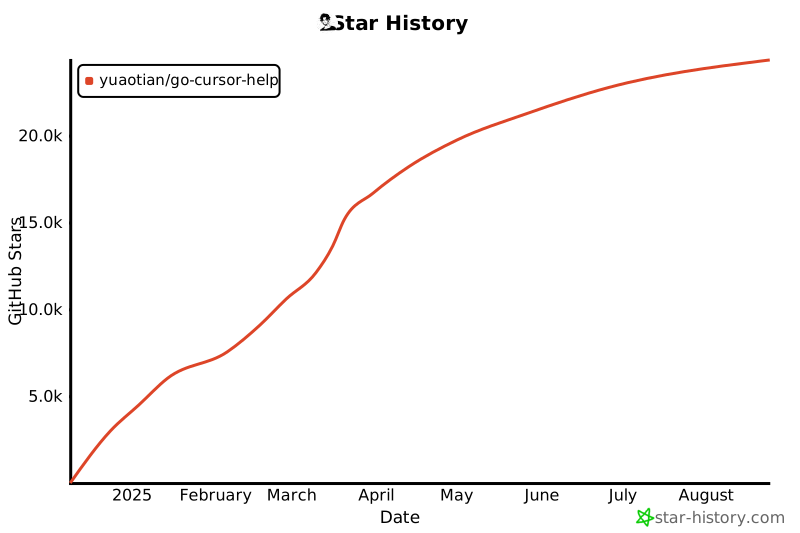
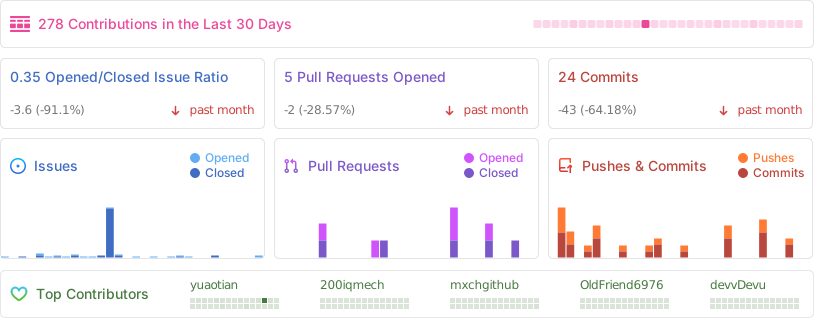
## ⭐ Project Stats
|
||
|
||
<div align="center">
|
||
|
||
[](https://star-history.com/#yuaotian/go-cursor-help&Date)
|
||
|
||
|
||
|
||
</div>
|
||
|
||
## 📄 License
|
||
|
||
<details>
|
||
<summary><b>MIT License</b></summary>
|
||
|
||
Copyright (c) 2024
|
||
|
||
Permission is hereby granted, free of charge, to any person obtaining a copy
|
||
of this software and associated documentation files (the "Software"), to deal
|
||
in the Software without restriction, including without limitation the rights
|
||
to use, copy, modify, merge, publish, distribute, sublicense, and/or sell
|
||
copies of the Software, and to permit persons to whom the Software is
|
||
furnished to do so, subject to the following conditions:
|
||
|
||
The above copyright notice and this permission notice shall be included in all
|
||
copies or substantial portions of the Software.
|
||
|
||
</details>
|
||
|