WhisperLiveKit
Real-time, Fully Local Whisper's Speech-to-Text and Speaker Diarization



This project is based on [Whisper Streaming](https://github.com/ufal/whisper_streaming) and lets you transcribe audio directly from your browser. Simply launch the local server and grant microphone access. Everything runs locally on your machine ✨
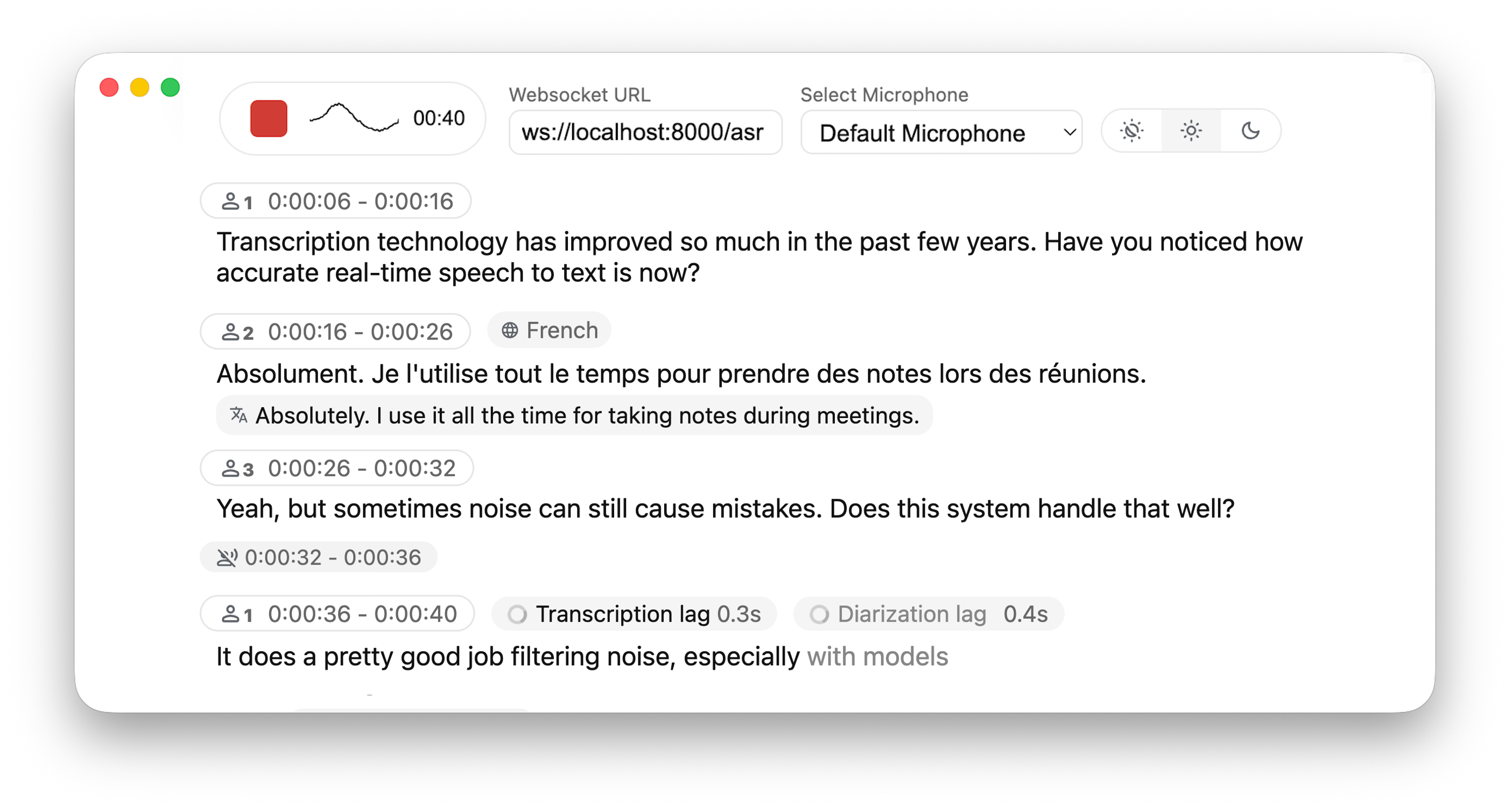
### Differences from [Whisper Streaming](https://github.com/ufal/whisper_streaming)
#### ⚙️ **Core Improvements**
- **Buffering Preview** – Displays unvalidated transcription segments
- **Multi-User Support** – Handles multiple users simultaneously by decoupling backend and online asr
- **MLX Whisper Backend** – Optimized for Apple Silicon for faster local processing.
- **Confidence validation** – Immediately validate high-confidence tokens for faster inference
#### 🎙️ **Speaker Identification**
- **Real-Time Diarization** – Identify different speakers in real time using [Diart](https://github.com/juanmc2005/diart)
#### 🌐 **Web & API**
- **Built-in Web UI** – Simple raw html browser interface with no frontend setup required
- **FastAPI WebSocket Server** – Real-time speech-to-text processing with async FFmpeg streaming.
- **JavaScript Client** – Ready-to-use MediaRecorder implementation for seamless client-side integration.
## Installation
### Via pip (recommended)
```bash
pip install whisperlivekit
```
### From source
```bash
git clone https://github.com/QuentinFuxa/WhisperLiveKit
cd WhisperLiveKit
pip install -e .
```
### System Dependencies
You need to install FFmpeg on your system:
```bash
# For Ubuntu/Debian:
sudo apt install ffmpeg
# For macOS:
brew install ffmpeg
# For Windows:
# Download from https://ffmpeg.org/download.html and add to PATH
```
### Optional Dependencies
```bash
# If you want to use VAC (Voice Activity Controller). Useful for preventing hallucinations
pip install torch
# If you choose sentences as buffer trimming strategy
pip install mosestokenizer wtpsplit
pip install tokenize_uk # If you work with Ukrainian text
# If you want to use diarization
pip install diart
```
### Get access to 🎹 pyannote models
By default, diart is based on [pyannote.audio](https://github.com/pyannote/pyannote-audio) models from the [huggingface](https://huggingface.co/) hub.
In order to use them, please follow these steps:
1) [Accept user conditions](https://huggingface.co/pyannote/segmentation) for the `pyannote/segmentation` model
2) [Accept user conditions](https://huggingface.co/pyannote/segmentation-3.0) for the newest `pyannote/segmentation-3.0` model
3) [Accept user conditions](https://huggingface.co/pyannote/embedding) for the `pyannote/embedding` model
4) Install [huggingface-cli](https://huggingface.co/docs/huggingface_hub/quick-start#install-the-hub-library) and [log in](https://huggingface.co/docs/huggingface_hub/quick-start#login) with your user access token (or provide it manually in diart CLI or API).
## Usage
### Using the command-line tool
After installation, you can start the server using the provided command-line tool:
```bash
whisperlivekit-server --host 0.0.0.0 --port 8000 --model tiny.en
```
Then open your browser at `http://localhost:8000` (or your specified host and port).
### Using the library in your code
```python
from whisperlivekit import WhisperLiveKit
from whisperlivekit.audio_processor import AudioProcessor
from fastapi import FastAPI, WebSocket
kit = WhisperLiveKit(model="medium", diarization=True)
app = FastAPI() # Create a FastAPI application
@app.get("/")
async def get():
return HTMLResponse(kit.web_interface()) # Use the built-in web interface
async def handle_websocket_results(websocket, results_generator): # Sends results to frontend
async for response in results_generator:
await websocket.send_json(response)
@app.websocket("/asr")
async def websocket_endpoint(websocket: WebSocket):
audio_processor = AudioProcessor()
await websocket.accept()
results_generator = await audio_processor.create_tasks()
websocket_task = asyncio.create_task(handle_websocket_results(websocket, results_generator))
while True:
message = await websocket.receive_bytes()
await audio_processor.process_audio(message)
```
For a complete audio processing example, check [whisper_fastapi_online_server.py](https://github.com/QuentinFuxa/WhisperLiveKit/blob/main/whisper_fastapi_online_server.py)
## Configuration Options
The following parameters are supported when initializing `WhisperLiveKit`:
- `--host` and `--port` let you specify the server's IP/port.
- `--min-chunk-size` sets the minimum chunk size for audio processing. Make sure this value aligns with the chunk size selected in the frontend. If not aligned, the system will work but may unnecessarily over-process audio data.
- `--no-transcription`: Disable transcription (enabled by default)
- `--diarization`: Enable speaker diarization (disabled by default)
- `--confidence-validation`: Use confidence scores for faster validation. Transcription will be faster but punctuation might be less accurate (disabled by default)
- `--warmup-file`: The path to a speech audio wav file to warm up Whisper so that the very first chunk processing is fast:
- If not set, uses https://github.com/ggerganov/whisper.cpp/raw/master/samples/jfk.wav.
- If False, no warmup is performed.
- `--min-chunk-size` Minimum audio chunk size in seconds. It waits up to this time to do processing. If the processing takes shorter time, it waits, otherwise it processes the whole segment that was received by this time.
- `--model`: Name size of the Whisper model to use (default: tiny). Suggested values: tiny.en, tiny, base.en, base, small.en, small, medium.en, medium, large-v1, large-v2, large-v3, large, large-v3-turbo. The model is automatically downloaded from the model hub if not present in model cache dir.
- `--model_cache_dir`: Overriding the default model cache dir where models downloaded from the hub are saved
- `--model_dir`: Dir where Whisper model.bin and other files are saved. This option overrides --model and --model_cache_dir parameter.
- `--lan`, `--language`: Source language code, e.g. en,de,cs, or 'auto' for language detection.
- `--task` {_transcribe, translate_}: Transcribe or translate. If translate is set, we recommend avoiding the _large-v3-turbo_ backend, as it [performs significantly worse](https://github.com/QuentinFuxa/whisper_streaming_web/issues/40#issuecomment-2652816533) than other models for translation.
- `--backend` {_faster-whisper, whisper_timestamped, openai-api, mlx-whisper_}: Load only this backend for Whisper processing.
- `--vac`: Use VAC = voice activity controller. Requires torch. (disabled by default)
- `--vac-chunk-size`: VAC sample size in seconds.
- `--no-vad`: Disable VAD (voice activity detection), which is enabled by default.
- `--buffer_trimming` {_sentence, segment_}: Buffer trimming strategy -- trim completed sentences marked with punctuation mark and detected by sentence segmenter, or the completed segments returned by Whisper. Sentence segmenter must be installed for "sentence" option.
- `--buffer_trimming_sec`: Buffer trimming length threshold in seconds. If buffer length is longer, trimming sentence/segment is triggered.
## How the Live Interface Works
- Once you **allow microphone access**, the page records small chunks of audio using the **MediaRecorder** API in **webm/opus** format.
- These chunks are sent over a **WebSocket** to the FastAPI endpoint at `/asr`.
- The Python server decodes `.webm` chunks on the fly using **FFmpeg** and streams them into the **whisper streaming** implementation for transcription.
- **Partial transcription** appears as soon as enough audio is processed. The "unvalidated" text is shown in **lighter or grey color** (i.e., an 'aperçu') to indicate it's still buffered partial output. Once Whisper finalizes that segment, it's displayed in normal text.
### Deploying to a Remote Server
If you want to **deploy** this setup:
1. **Host the FastAPI app** behind a production-grade HTTP(S) server (like **Uvicorn + Nginx** or Docker). If you use HTTPS, use "wss" instead of "ws" in WebSocket URL.
2. The **HTML/JS page** can be served by the same FastAPI app or a separate static host.
3. Users open the page in **Chrome/Firefox** (any modern browser that supports MediaRecorder + WebSocket). No additional front-end libraries or frameworks are required.
## Acknowledgments
This project builds upon the foundational work of the Whisper Streaming and Diart projects. We extend our gratitude to the original authors for their contributions.